
183 lines
6.8 KiB
Markdown
183 lines
6.8 KiB
Markdown
<p align="center">
|
|
<a href="https://github.com/mem0ai/mem0">
|
|
<img src="docs/images/banner.png" width="800px" alt="Mem0 Logo">
|
|
</a>
|
|
<h3 align="center">Mem0</h3>
|
|
<p align="center">
|
|
The Memory Layer for Personalized AI.<br/>
|
|
<a href="https://mem0.ai"><strong>Learn more »</strong></a></br>
|
|
</p>
|
|
</p>
|
|
|
|
<p align="center">
|
|
<a href="https://mem0.ai/discord">
|
|
<img src="https://dcbadge.vercel.app/api/server/6PzXDgEjG5?style=flat" alt="Mem0 Discord">
|
|
</a>
|
|
<a href="https://pepy.tech/project/mem0ai">
|
|
<img src="https://img.shields.io/pypi/dm/mem0ai" alt="Mem0 PyPI - Downloads" >
|
|
</a>
|
|
<a href="https://www.ycombinator.com/companies/mem0">
|
|
<img src="https://img.shields.io/badge/Y%20Combinator-S24-orange?style=flat-square" alt="Y Combinator S24">
|
|
</a>
|
|
<a href="https://x.com/mem0ai">
|
|
<img src="https://img.shields.io/twitter/follow/mem0ai" alt="Mem0 Twitter">
|
|
</a>
|
|
</p>
|
|
|
|
# Mem0: The Memory Layer for Personalized AI
|
|
|
|
[Mem0](https://mem0.ai) enhances AI agents and Large Language Models (LLMs) with an intelligent memory layer. By retaining and utilizing contextual information, Mem0 enables more personalized and effective AI interactions across various applications. Whether you're building customer support chatbots, AI assistants, or autonomous systems, Mem0 helps your AI remember user preferences, adapt to individual needs, and continuously improve over time.
|
|
|
|
Use cases enabled by Mem0 include:
|
|
|
|
- **Personalized Learning Assistants**: Enhance learning experiences with tailored content recommendations and progress tracking.
|
|
- **Customer Support AI Agents**: Provide context-aware assistance by remembering past interactions and user preferences.
|
|
- **Healthcare Assistants**: Keep track of patient history, treatment plans, and medication schedules for personalized care.
|
|
- **Virtual Companions**: Build deeper relationships with users by remembering personal details and past conversations.
|
|
- **Productivity Tools**: Streamline workflows by remembering user habits, frequently used documents, and task history.
|
|
- **Gaming AI**: Create immersive gaming experiences by adapting game environments based on player choices and progress.
|
|
|
|
## Get Started
|
|
|
|
The simplest way to set up Mem0 is to create a managed deployment with Mem0 Cloud. This hosted solution offers a hassle-free experience with automatic updates, advanced analytics, and dedicated support. [Sign up](https://app.mem0.ai/) for Mem0 Cloud to get started.
|
|
|
|
If you prefer to install and manage Mem0 yourself, you can use the open-source Mem0 package. Read the [manual installation instructions](#install) below to get started with Mem0 on your machine.
|
|
|
|
## Manual Installation Instructions <a name="install"></a>
|
|
|
|
The Mem0 package can be installed directly from pip command in the terminal.
|
|
|
|
```bash
|
|
pip install mem0ai
|
|
```
|
|
|
|
Alternatively, you can use Mem0 in one click using the hosted platform [here](https://app.mem0.ai/).
|
|
|
|
### Basic Usage
|
|
|
|
Mem0 supports a variety of LLMs, with details available in our [Supported LLMs documentation](https://docs.mem0.ai/llms). By default, Mem0 comes equipped with `gpt-4o`. To use it, simply set the keys in the environment variables.
|
|
|
|
|
|
```python
|
|
import os
|
|
os.environ["OPENAI_API_KEY"] = "sk-xxx"
|
|
```
|
|
|
|
Now, you can simply initialize the memory.
|
|
|
|
```python
|
|
from mem0 import Memory
|
|
|
|
m = Memory()
|
|
```
|
|
|
|
You can perform the following task on the memory.
|
|
1. Add: adds memory
|
|
2. Update: update memory of a given memory_id
|
|
3. Search: fetch memories based on a query
|
|
4. Get: return memories for a certain user/agent/session
|
|
5. History: describes how a memory has changed over time for a specific memory ID
|
|
|
|
```python
|
|
# 1. Add: Store a memory from any unstructured text
|
|
result = m.add("I am working on improving my tennis skills. Suggest some online courses.", user_id="alice", metadata={"category": "hobbies"})
|
|
|
|
# Created memory --> 'Improving her tennis skills.' and 'Looking for online suggestions.'
|
|
```
|
|
|
|
```python
|
|
# 2. Update: update the memory
|
|
result = m.update(memory_id=<memory_id_1>, data="Likes to play tennis on weekends")
|
|
|
|
# Updated memory --> 'Likes to play tennis on weekends.' and 'Looking for online suggestions.'
|
|
```
|
|
|
|
```python
|
|
# 3. Search: search related memories
|
|
related_memories = m.search(query="What are Alice's hobbies?", user_id="alice")
|
|
|
|
# Retrieved memory --> 'Likes to play tennis on weekends'
|
|
```
|
|
|
|
```python
|
|
# 4. Get all memories
|
|
all_memories = m.get_all()
|
|
memory_id = all_memories[0]["id"] # get a memory_id
|
|
|
|
# All memory items --> 'Likes to play tennis on weekends.' and 'Looking for online suggestions.'
|
|
```
|
|
|
|
```python
|
|
# 5. Get memory history for a particular memory_id
|
|
history = m.history(memory_id=<memory_id_1>)
|
|
|
|
# Logs corresponding to memory_id_1 --> {'prev_value': 'Working on improving tennis skills and interested in online courses for tennis.', 'new_value': 'Likes to play tennis on weekends' }
|
|
```
|
|
|
|
> [!TIP]
|
|
> If you are looking for a hosted version and don't want to setup the infrastucture yourself, checkout [Mem0 Cloud](https://app.mem0.ai/) to get started in minutes.
|
|
|
|
## Core Features
|
|
|
|
- **Multi-Level Memory**: User, Session, and AI Agent memory retention
|
|
- **Adaptive Personalization**: Continuous improvement based on interactions
|
|
- **Developer-Friendly API**: Simple integration into various applications
|
|
- **Cross-Platform Consistency**: Uniform behavior across devices
|
|
- **Managed Service**: Hassle-free hosted solution
|
|
|
|
## Documentation
|
|
|
|
For detailed usage instructions and API reference, visit our documentation at [docs.mem0.ai](https://docs.mem0.ai).
|
|
|
|
## Advanced Usage
|
|
|
|
For production environments, you can use Qdrant as a vector store:
|
|
|
|
```python
|
|
from mem0 import Memory
|
|
|
|
config = {
|
|
"vector_store": {
|
|
"provider": "qdrant",
|
|
"config": {
|
|
"host": "localhost",
|
|
"port": 6333,
|
|
}
|
|
},
|
|
}
|
|
|
|
m = Memory.from_config(config)
|
|
```
|
|
|
|
## Roadmap
|
|
|
|
- Integration with various LLM providers
|
|
- Support for LLM frameworks
|
|
- Integration with AI Agents frameworks
|
|
- Customizable memory creation/update rules
|
|
|
|
## Star History
|
|
|
|
[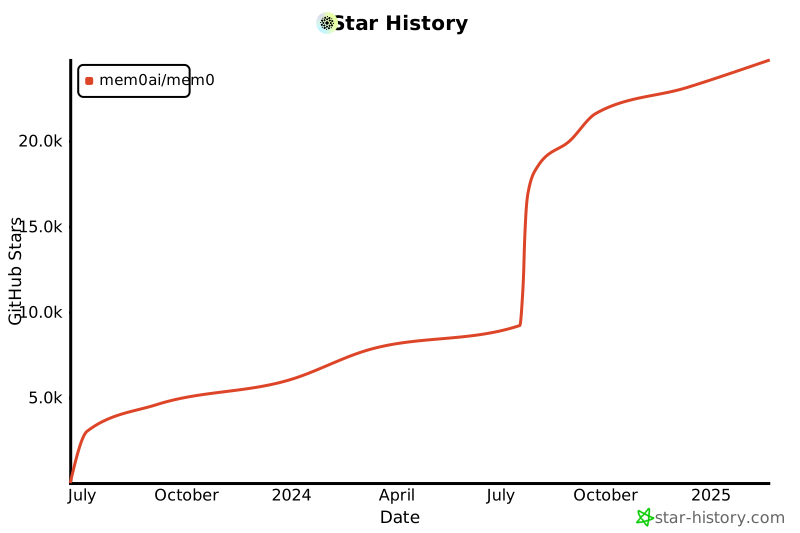](https://star-history.com/#mem0ai/mem0&Date)
|
|
|
|
## Support
|
|
Join our Slack or Discord community for support and discussions.
|
|
If you have any questions, feel free to reach out to us using one of the following methods:
|
|
|
|
- [Join our Discord](https://mem0.ai/discord)
|
|
- [Join our Slack](https://mem0.ai/slack)
|
|
- [Join our newsletter](https://mem0.ai/email)
|
|
- [Follow us on Twitter](https://x.com/mem0ai)
|
|
- [Email us](mailto:founders@mem0.ai)
|
|
|
|
## Contributors
|
|
|
|
We value and appreciate the contributions of our community. Special thanks to our contributors for helping us improve Mem0.
|
|
|
|
<a href="https://github.com/mem0ai/mem0/graphs/contributors">
|
|
<img src="https://contrib.rocks/image?repo=mem0ai/mem0" />
|
|
</a>
|
|
|
|
## License
|
|
|
|
This project is licensed under the Apache 2.0 License - see the [LICENSE](LICENSE) file for details. |