
187 lines
6.6 KiB
Markdown
187 lines
6.6 KiB
Markdown
<p align="center">
|
|
<a href="https://github.com/mem0ai/mem0">
|
|
<img src="docs/images/banner-sm.png" width="800px" alt="Mem0 - The Memory Layer for Personalized AI">
|
|
</a>
|
|
<p align="center">
|
|
<a href="https://mem0.ai/discord">Learn more</a>
|
|
·
|
|
<a href="https://mem0.ai/discord">Join Discord</a>
|
|
</p>
|
|
</p>
|
|
|
|
<p align="center">
|
|
<a href="https://mem0.ai/discord">
|
|
<img src="https://dcbadge.vercel.app/api/server/6PzXDgEjG5?style=flat" alt="Mem0 Discord">
|
|
</a>
|
|
<a href="https://pepy.tech/project/mem0ai">
|
|
<img src="https://img.shields.io/pypi/dm/mem0ai" alt="Mem0 PyPI - Downloads" >
|
|
</a>
|
|
<a href="https://www.ycombinator.com/companies/mem0">
|
|
<img src="https://img.shields.io/badge/Y%20Combinator-S24-orange?style=flat-square" alt="Y Combinator S24">
|
|
</a>
|
|
</p>
|
|
|
|
# Introduction
|
|
|
|
* [Mem0](https://mem0.ai) enhances AI assistants and agents with an intelligent memory layer, enabling personalized AI interactions.
|
|
|
|
* Mem0 remembers user preferences, adapts to individual needs, and continuously improves over time, making it ideal for customer support chatbots, AI assistants, and autonomous systems.
|
|
|
|
Use cases enabled by Mem0 include:
|
|
|
|
- **AI Assistants and agents**: Seamless conversations with a touch of déjà vu
|
|
- **Personalized Learning**: Tailored content recommendations and progress tracking
|
|
- **Customer Support**: Context-aware assistance with user preference memory
|
|
- **Healthcare**: Patient history and treatment plan management
|
|
- **Virtual Companions**: Deeper user relationships through conversation memory
|
|
- **Productivity**: Streamlined workflows based on user habits and task history
|
|
- **Gaming**: Adaptive environments reflecting player choices and progress
|
|
|
|
## Get Started
|
|
|
|
The easiest way to set up Mem0 is through the managed [Mem0 Platform](https://app.mem0.ai). This hosted solution offers automatic updates, advanced analytics, and dedicated support. [Sign up](https://app.mem0.ai) to get started.
|
|
|
|
If you prefer to self-host, use the open-source Mem0 package. Follow the [installation instructions](#install) to get started.
|
|
|
|
## Installation Instructions <a name="install"></a>
|
|
|
|
Install the Mem0 package via pip:
|
|
|
|
```bash
|
|
pip install mem0ai
|
|
```
|
|
|
|
Alternatively, you can use Mem0 with one click on the hosted platform [here](https://app.mem0.ai/).
|
|
|
|
### Basic Usage
|
|
|
|
Mem0 supports a variety of LLMs, with details available in our [Supported LLMs documentation](https://docs.mem0.ai/llms). By default, Mem0 comes equipped with `gpt-4o`. To use it, simply set the keys in the environment variables.
|
|
|
|
|
|
```python
|
|
import os
|
|
os.environ["OPENAI_API_KEY"] = "sk-xxx"
|
|
```
|
|
|
|
Now, you can initialize the memory:
|
|
|
|
```python
|
|
from mem0 import Memory
|
|
|
|
m = Memory()
|
|
```
|
|
|
|
You can perform the following task on the memory:
|
|
|
|
1. Add: Store a memory from any unstructured text
|
|
2. Update: Update memory of a given memory_id
|
|
3. Search: Fetch memories based on a query
|
|
4. Get: Return memories for a certain user/agent/session
|
|
5. History: Describe how a memory has changed over time for a specific memory ID
|
|
|
|
```python
|
|
# 1. Add: Store a memory from any unstructured text
|
|
result = m.add("I am working on improving my tennis skills. Suggest some online courses.", user_id="alice", metadata={"category": "hobbies"})
|
|
|
|
# Created memory --> 'Improving her tennis skills.' and 'Looking for online suggestions.'
|
|
```
|
|
|
|
```python
|
|
# 2. Update: update the memory
|
|
result = m.update(memory_id=<memory_id_1>, data="Likes to play tennis on weekends")
|
|
|
|
# Updated memory --> 'Likes to play tennis on weekends.' and 'Looking for online suggestions.'
|
|
```
|
|
|
|
```python
|
|
# 3. Search: search related memories
|
|
related_memories = m.search(query="What are Alice's hobbies?", user_id="alice")
|
|
|
|
# Retrieved memory --> 'Likes to play tennis on weekends'
|
|
```
|
|
|
|
```python
|
|
# 4. Get all memories
|
|
all_memories = m.get_all()
|
|
memory_id = all_memories[0]["id"] # get a memory_id
|
|
|
|
# All memory items --> 'Likes to play tennis on weekends.' and 'Looking for online suggestions.'
|
|
```
|
|
|
|
```python
|
|
# 5. Get memory history for a particular memory_id
|
|
history = m.history(memory_id=<memory_id_1>)
|
|
|
|
# Logs corresponding to memory_id_1 --> {'prev_value': 'Working on improving tennis skills and interested in online courses for tennis.', 'new_value': 'Likes to play tennis on weekends' }
|
|
```
|
|
|
|
> [!TIP]
|
|
> If you prefer a hosted version without the need to set up infrastructure yourself, check out the [Mem0 Platform](https://app.mem0.ai/) to get started in minutes.
|
|
|
|
|
|
## Core Features
|
|
|
|
- **Multi-Level Memory**: User, Session, and AI Agent memory retention
|
|
- **Adaptive Personalization**: Continuous improvement based on interactions
|
|
- **Developer-Friendly API**: Simple integration into various applications
|
|
- **Cross-Platform Consistency**: Uniform behavior across devices
|
|
- **Managed Service**: Hassle-free hosted solution
|
|
|
|
## Documentation
|
|
|
|
For detailed usage instructions and API reference, visit our documentation at [docs.mem0.ai](https://docs.mem0.ai). Here, you can find more information on both the open-source version and the hosted [Mem0 Platform](https://app.mem0.ai).
|
|
|
|
## Advanced Usage
|
|
|
|
For production environments, you can use Qdrant as a vector store:
|
|
|
|
```python
|
|
from mem0 import Memory
|
|
|
|
config = {
|
|
"vector_store": {
|
|
"provider": "qdrant",
|
|
"config": {
|
|
"host": "localhost",
|
|
"port": 6333,
|
|
}
|
|
},
|
|
}
|
|
|
|
m = Memory.from_config(config)
|
|
```
|
|
|
|
## Roadmap
|
|
|
|
- Integration with various LLM providers
|
|
- Support for LLM frameworks
|
|
- Integration with AI Agents frameworks
|
|
- Customizable memory creation/update rules
|
|
|
|
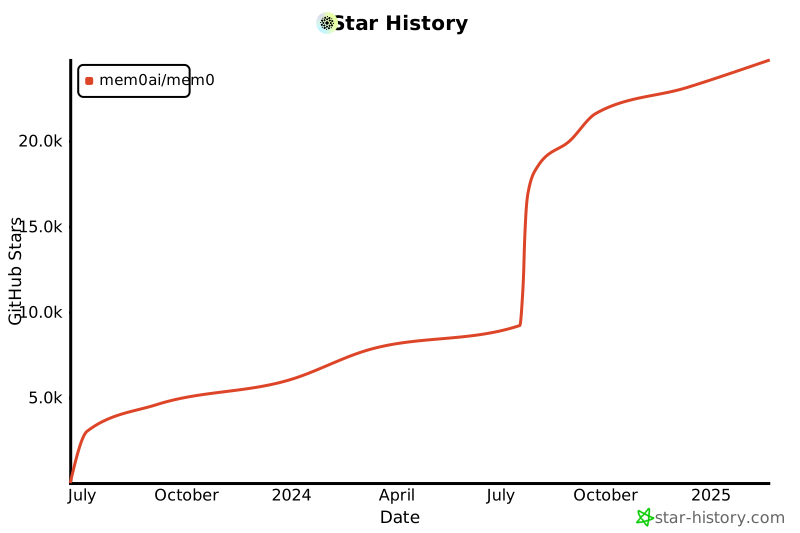
## Star History
|
|
|
|
[](https://star-history.com/#mem0ai/mem0&Date)
|
|
|
|
## Support
|
|
|
|
Join our community for support and discussions. If you have any questions, feel free to reach out to us using one of the following methods:
|
|
|
|
- [Join our Discord](https://mem0.ai/discord)
|
|
- [Join our Slack](https://mem0.ai/slack)
|
|
- [Join our newsletter](https://mem0.ai/email)
|
|
- [Follow us on Twitter](https://x.com/mem0ai)
|
|
- [Email us](mailto:founders@mem0.ai)
|
|
|
|
## Contributors
|
|
|
|
Join our [Discord community](https://mem0.ai/discord) to learn about memory management for AI agents and LLMs, and connect with Mem0 users and contributors. Share your ideas, questions, or feedback in our [GitHub Issues](https://github.com/mem0ai/mem0/issues).
|
|
|
|
We value and appreciate the contributions of our community. Special thanks to our contributors for helping us improve Mem0.
|
|
|
|
<a href="https://github.com/mem0ai/mem0/graphs/contributors">
|
|
<img src="https://contrib.rocks/image?repo=mem0ai/mem0" />
|
|
</a>
|
|
|
|
## License
|
|
|
|
This project is licensed under the Apache 2.0 License - see the [LICENSE](LICENSE) file for details. |