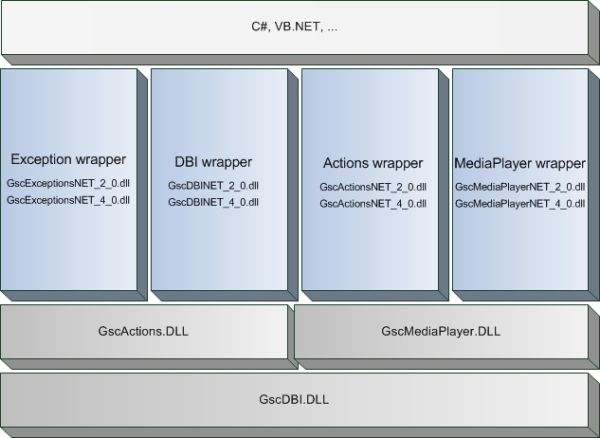
To make the usage of the native Win32 DLLs easier in .NET languages like C# or VB.NET, the SDK contains some wrapper assemblies around the plain SDK DLLs.
These wrapper assemblies are developed in C++/CLI and published with the SDK. The assemblies can be found in the GeViScope SDK binary folder “GeViScopeSDK\BIN”.
The SDK provides wrapper assemblies for the .NET-Frameworks versions 2.0 and 4.0 which are named as follows:
.NET-Framework 2.0
• GscExceptionsNET_2_0.dll
• GscActionsNET_2_0.dll
• GscMediaPlayerNET_2_0.dll
• GscDBINET_2_0.dll
.NET-Framework 4.0
• GscExceptionsNET_4_0.dll
• GscActionsNET_4_0.dll
• GscMediaPlayerNET_4_0.dll
• GscDBINET_4_0.dll
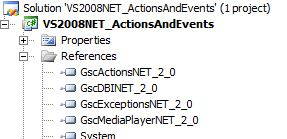
These wrapper assemblies can be used together with our native SDK DLLs (GscActions.DLL, GscDBI.DLL, GscHelper.DLL, GscMediaPlayer.DLL, MscDBI.DLL) to create custom applications under any .NET language on a windows platform. The assemblies need to be referenced by the .NET project and all the files (assemblies and native DLLs) have to reside in the application folder.
To successfully deploy a custom application that uses the .NET wrapper contained in the SDK, the following prerequisites have to be fulfilled:
a) Microsoft Visual C++ Redistributable Package has to be installed
The wrapper assemblies are developed in C++/CLI. So for executing them on a none development machine, the Microsoft Visual C++ Redistributable Package is needed. This package exists in a debug or in a release version. On productive machines the release version needs to be installed.
For applications using the .NET-Framework 2.0 the Visual C++ 2008 Redistributable Package is needed. In case that the application is developed using the .NET-Framework 4.0 you need to install the Visual C++ 2010 Redistributable Package.
b) .NET Framework Version 2.0 SP 1 or newer has to be installed
If updating the .NET Framework on a GEUTEBRÜCK device (GeViScope or re_porter) fails, a special Microsoft tool Windows Installer CleanUp Utility (MSICUU2.exe) can improve the situation. After executing this tool, updating the Framework should be possible.
c) Wrapper assemblies AND native SDK DLLs are needed
Beside the custom application also the wrapper assemblies and the native SDK DLLs (listed above) are needed in the same folder as in which the custom application resides.
If the application uses the .NET-Framework 4.0 you need to reference the GeViScope wrapper DLLs with the extension _4_0 otherwise please use the wrapper assemblies with the extension _2_0 (see above).